
Corpospeak, my first app on the App Store
At 2:41 this morning, Apple approved my first app. It’s called Corpospeak: In Your Voice, and it’s free. You talk, and it says your sentence back to you as fluent corporate jargon, in a clone of your own voice.
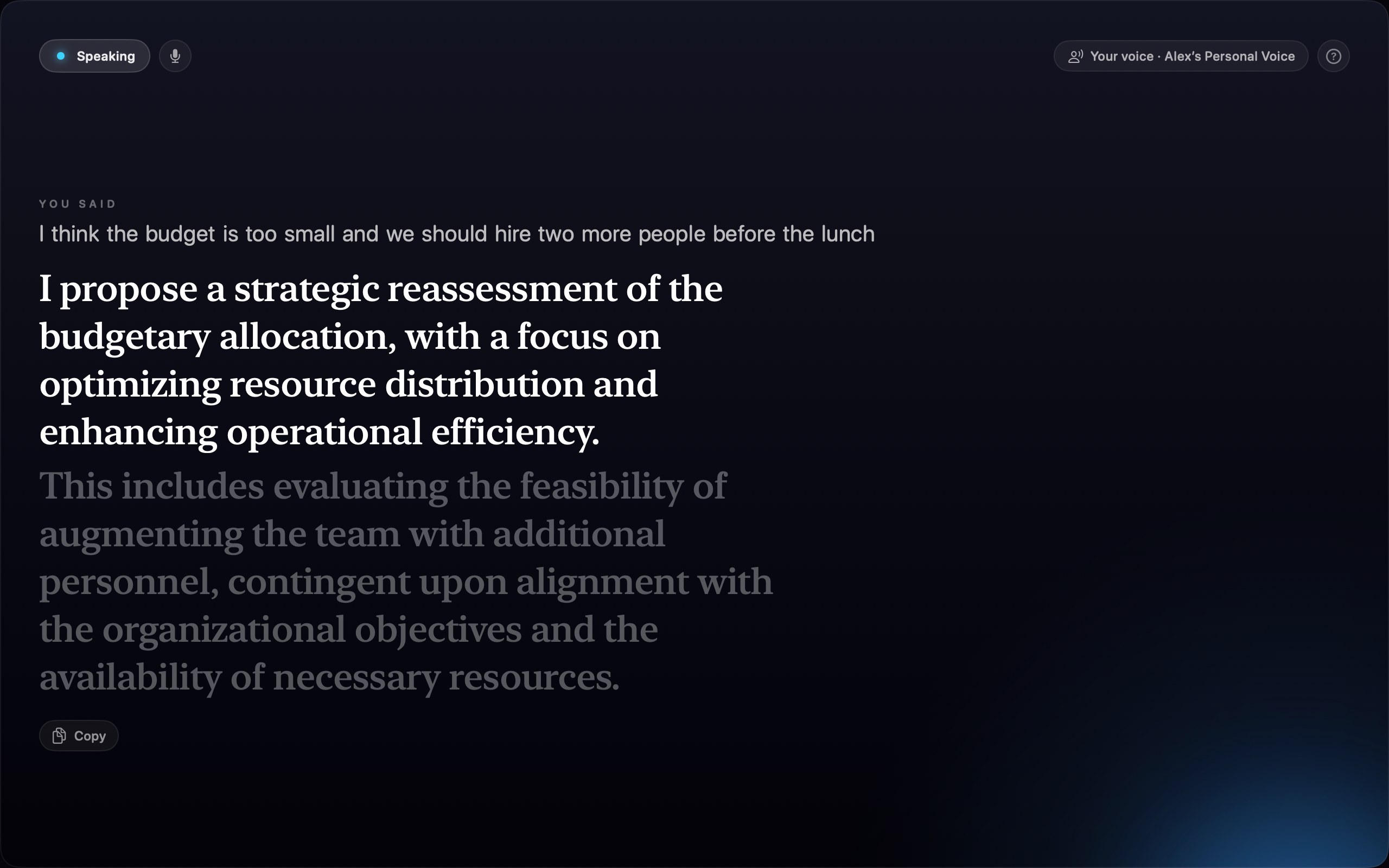
Say the top line, hear the bottom one. Click for the full-size version.
This is the first case study in the series I started last week. Call it app 1/n. I made the first commit on 3 September and submitted the app on the 4th. App Review came back with questions on the 5th. Apple approved it this morning. Seven days, start to store.
Why I wrote it
It started as a joke about the gap between what people say in meetings and what they mean. But the reason I finished it is the argument in the first post: building software got cheap enough that an app no longer has to appeal to a million people to justify existing. It only has to solve one real problem properly, and “I know what I mean, but that is not how you’d put it in a meeting” is a real problem in a lot of offices.
The other reason is that Corpospeak is the clearest demonstration I have of how much Apple now hands you for nothing. Transcribe continuous speech, run it through a language model, and speak the answer back in a clone of the speaker’s voice. A few years ago that would have been a team, a server bill, and a privacy policy people are right to be suspicious of. It is now about 2,700 lines of Swift, and it runs on a phone in aeroplane mode. The single view file is the largest thing in it. The whole listen-rewrite-speak pipeline is smaller than the view. There are no network calls in the app at all. Dictation is Apple’s Speech framework pinned to on-device recognition, the rewrite is the on-device Apple Intelligence model, and playback is the Personal Voice that iOS or macOS builds for you from about a minute of reading aloud.
When a capability gets that cheap, the sensible response is to make a lot of small things with it and find out which ones people actually use. This is me finding out.
Shorter prompts made it worse
I assumed the prompt was where I’d spend an afternoon. I spent most of a week there, and almost everything I believed going in was wrong.
The obvious optimisation, when a rewrite takes two seconds on-device, is to make the prompt smaller. So I cut the phrasebook down to bare phrases, and the rules to a few lines. Side by side against the full prompt, the short version was clearly worse: the model started pasting the example content into its answers, adding preambles, and running on past the end of the thought. The long prompt wasn’t costing me anything I could get back. The fix for the latency wasn’t a smaller prompt, it was hiding the cost. The app warms up the next model session while you’re still talking, so by the time you stop, the instructions have already been read.
Two more things fell out of that week, and I’d never have guessed either:
The few-shot examples must not be about work. If they are, the model quietly lifts details out of them and drops them into your sentence. Say something about a deadline and get back someone else’s deadline. The examples now are about anything but work.
The prompt must not contain a list of jargon words. Give the model a glossary and every so often it replies with the glossary. The words have to be taught by example, not by inventory.
And then the one that actually hurt. On the iOS 27 beta, the model’s safety guardrail refuses the prompt outright unless the examples are about work. So the exact change that fixes the model on one OS version breaks it on the next. The app now picks a different set of examples depending on which OS it is running on. The on-device model is not one model. It is a different model on every OS release, and you find out by testing on every OS release.
You cannot tune a prompt by feel
I only know any of the above because I stopped guessing and wrote an eval. It’s a harness that runs a set of sentences through a candidate prompt and scores three things: how many of the speaker’s actual facts survive the rewrite, whether example text leaks into the output, and whether the reply runs away. Every finding in the last section came out of that harness. None of them came out of me trying it a few times and forming an opinion.
This is the thing I’d tell anyone building an AI feature. It’s the same conclusion I reached in the first post, from the other direction. The model is not the hard part any more, and neither is the code. Knowing whether the thing works is the hard part. If you can’t measure it, you’re shipping a vibe.
The sting in the tail is that the harness runs on my Mac, and the Mac’s on-device model is not the phone’s on-device model. To measure the phone I had to build a throwaway app whose only job was to run the prompt and print to stderr, launch it over a cable with the phone unlocked, and read the output in a terminal. That’s the loop, and it is not a good loop. But it’s a real measurement, which the one on my Mac wasn’t.
Licences still bite
Apple’s built-in speech voices are poor. Worse than Siri, somehow. They’re a fallback rather than a choice, and if you haven’t recorded a Personal Voice you get one of them. I wanted a decent neural voice underneath instead, and settled on Kokoro, an 82-million-parameter model that synthesises about nineteen times faster than real time on the Neural Engine. Easily fast enough.
Then the boring problem. The phonemiser everyone pairs Kokoro with is espeak-ng, which is GPL-3.0, which cannot go into an App Store binary. Most of the Swift ports don’t say which phonemiser they use, and that is worse than saying the wrong thing. I chose a port specifically because it uses a Core ML grapheme-to-phoneme model and doesn’t link espeak at all. I still had to read the dependency tree to be sure. The last twenty years of licence diligence didn’t go anywhere just because an agent now writes the code. If anything an agent will cheerfully add a dependency you can’t ship, and it won’t be the one that has to explain it.
The same promise cost me size, too. “No network connections at all” is in the README, the privacy policy and the App Review notes. So the model has to sit in the bundle, about 95MB of it, rather than download on first launch. If you make an absolute promise about privacy, be ready to pay for it in megabytes.
App Review wants to know why your app does nothing
Corpospeak is useless on a device without Apple Intelligence turned on, and a reviewer’s device may well not have it turned on. So on 5 September I got a Guideline 2.1 “Information Needed”: six written questions and a request for a screen recording.
That’s completely fair, and in hindsight obvious. If your app depends on a system feature that a reviewer has to go and enable, assume they haven’t. Put a recording in the submission the first time, showing the app working end to end with the microphone audible. I now keep the six answers written out in the repo next to the release instructions, because I’ll need them again for every submission.
There’s also no reliable way to stop an ineligible device installing it. Apple Intelligence needs an iPhone 15 Pro or later, or an M1 or A17 Pro iPad, and there’s no Info.plist key that gates on it. The closest one checks GPU tier, not the Neural Engine. Neither the App Store nor devicectl will stop you. The best you can do is detect it at launch and explain, which is what the app does. I found this out when I installed it on my own iPad, which is an A16, and watched it politely tell me it couldn’t work.
Replying to a rejection is not resubmitting
This one cost me three days and I’m still slightly annoyed about it.
I answered the review questions in the Resolution Center on the 5th and assumed that put the app back in the queue. It does not. A rejected version stays rejected, and unread, until you explicitly resubmit it. Resubmitting is two clicks on two different pages. First Update Review on the version page, and only then is Resubmit to App Review on the submission page no longer greyed out. The greyed-out button reads like a block. It’s just an ordering.
Build 1.0 (1) sat there for three days because I didn’t know that. Nothing was wrong with it. Nobody was looking at it.
The build that’s live is the wrong one
I’d rather not write this part, which is also why it’s worth writing.
The version Apple approved this morning is build 1.0 (1), the one I uploaded on 4 September, the day after I started. Builds 2 and 3 exist. I archived them, I uploaded them, and Apple processed them. I never attached them to the version. So everything I did after the 4th is sitting in App Store Connect rather than on anyone’s Mac: preferring your Personal Voice by default, the translation speed-up, the whole Kokoro voice engine and its licence saga.
And it is only on a Mac. The listing says “Only for Mac”, because iOS is a separate platform on the same app record and I never added it. iOS is the primary platform. It’s the one the app is for. I have never submitted it.
None of that is a technical problem. Every one of those steps is a form in a browser that I have to fill in myself. That is exactly the part I’m worst at, and the part the agent can’t do. Which is the thesis of the first post, arriving to collect. Building got cheap. Everything after building didn’t. I have shipped a seven-day app with a three-day mistake and a wrong build in it, and the code was never the bottleneck.
The next version fixes all of it. That one I’ll do carefully.
Corpospeak: In Your Voice is free on the Mac App Store. It needs an Apple silicon Mac running macOS 26 with Apple Intelligence turned on. The source is on GitHub under MIT, minus the icon and the name.
Co-authored by Claude. Claude wrote the app’s code, and helped write this post from the project’s own notes. The arguments, the judgements and the mistakes are mine.