
Spring MVC and MongoDB - Auditing Actions
I’ve been working on a new project to refresh myself on some technologies I’ve not worked on in a while.
The project is a Spring MVC app connected to a Mongo database. My goal was to add a annotation to my code that work record that the user had completed an action and the details of that action, and display it in a web page.
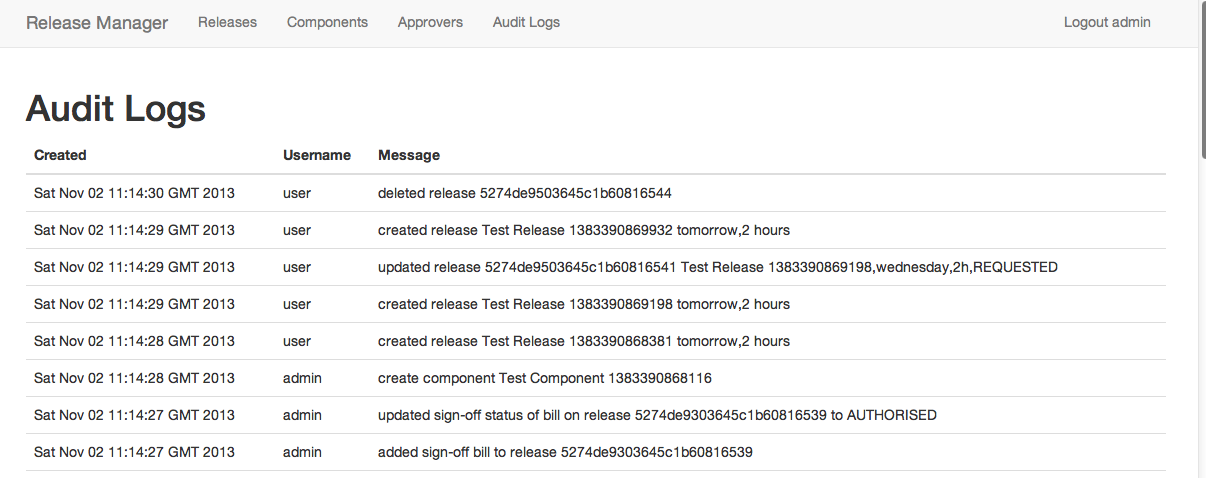
For example, when a new release is created:
	@Audit("created release {0} {2},{3}")
	@RequestMapping(value = "/releases", method = RequestMethod.POST)
	public String createRelease(String name, String desc, String when, String duration) {...}
This is a perfect fit for AOP. You’ll note this annotation has some placeholders to insert the parameters.
Step 1 - Adding an Auditting Aspect
To use this, you’ll need to add the Spring AOP dependencies to your POM:
<dependency>
	<groupId>org.springframework</groupId>
 	<artifactId>spring-aop</artifactId>
	<version>3.2.4.RELEASE</version>
</dependency>
And a new service to do the auditing, for the time being we’ll just print it:
public class AuditService {
        public void audit(String message) {
                System.out.println("Audit: " + getCurrentUser() + " - " + message);
        }

	private String getCurrentUser() {
                return SecurityContextHolder.getContext().getAuthentication().getName();
        }
}
And we’ll need some advice:
@Aspect
public class AuditAdvice {

        @Autowired
        AuditService auditService;

        @Around("@annotation(auditAnnotation)")
        public Object audit(ProceedingJoinPoint point, Audit auditAnnotation) throws Throwable {

                boolean ok = false;
                try {
                        Object o = point.proceed();
                        ok = true;
                        return o;
                } finally {
                        if (ok)
                                auditService.audit(MessageFormat.format(auditAnnotation.value(), point.getArgs()));
                }
        }
}
There are two things to notice about this:
- The advice addresses methods annotated with @Audit. As we’re using Spring AOP, only Spring beans will be advised.
- We using a join-point to get access to the arguments of the method, so we can use MessageFormat to format them.
- I only audit success, I could also audit failed attempts.
Spring requires some additional XML set-up for this to work.
<beans xmlns:xsi="http://www.w3.org/2001/XMLSchema-instance"
       xmlns="http://www.springframework.org/schema/beans"
       xmlns:aop="http://www.springframework.org/schema/aop"
       xsi:schemaLocation="http://www.springframework.org/schema/beans http://www.springframework.org/schema/beans/spring-beans-3.2.xsd http://www.springframework.org/schema/aop http://www.springframework.org/schema/aop/spring-aop.xsd">

    <aop:aspectj-autoproxy/>

    <bean class="com.alexecollins.releasemanager.web.audit.AuditService"/>
    <bean class="com.alexecollins.releasemanager.web.audit.AuditAdvice"/>

</beans>
The key thing to note is that I’ve enabled AOP using the app:aspectj-autoproxy. You can see these changes in this commit on Github.
Step 2 - Saving the Audit in the Database
I’m not going to go into the details of set up of Mongo on your computer, but if you use Homebrew it is:
brew install mongodb
mongod
And to give some quick pointers, here are the dependencies and the application context.
Now we’re logging the changes, we want to store them in the database so administrators can view them. I’m using Spring Data from this, so a simple new value object to save them. Lombok is very helpful for reduce boiler-plate on these types of classes:
public class AuditLog {
        private String id;
        private String username;
        private String message;
        private Date created = new Date();
        ...
And a repository to save them it:
public interface AuditLogRepository extends MongoRepository<AuditLog,String> {
}
To write the audit logs, we need to
public class AuditService {
        @Autowired
        AuditLogRepository repo;

        public void audit(String message) {

                AuditLog log = new AuditLog();
                log.setUsername( getCurrentUser());
                log.setMessage(message);
                repo.save(log);
		}
		...
Finally, I added a controller and JSP page so you can view the output.
Enjoy!