
A Reliable Push Button Release Pattern
I’ve been working to streamline a release build process recently. I’d heard of the Git Flow pattern for release builds, but found it too heavy for my liking.
I’ve been using a simpler release process for several years that works well with both SVN and Git, and on complex projects with many dependencies.
I tend to do two types of release:
- A mainline release. A big release containing new features, done about once a month.
- A interim release. A small release at any time containing only bug fixes. One that needs to get to production quickly.
In this post I’ll tell you about the caveats of this process, walk you though an example, and then show you how to set-up push button release builds that covers both big mainline feature releases (done from master) and smaller interim bug fix releases (done from a mainline release branch).
Mandatory Processes
Semantic Versioning
There is one major caveat to this process. You need to be using a semantic versioning system. I.e. version numbers need to have meaning. Semantic Versioning 2.0 is the method I’d recommend. You need to be using a semantic versioning system for both your project, and any dependencies you want to upgrade.
Why is this important? It’ll tell us what we can release . Semantic versioning, in the form will use tell us when we can upgrade our dependencies and when we can release them. Semantic versions take the format:
MAJOR.MINOR.PATCH
In a nutshell:
- MAJOR version changes indicate an API breaking change. One you would not want to automatically release and you’ll need to speak to your clients first.
- MINOR version changes indicate a new feature. Your project is still backwards compatible.
- PATCH (or INCREMENT) version changes indicate bug fixes and can be released anytime.
Automated Build Tests
It must NOT be possible to build un-tested software. Why? Because we are going to automated our release process end-to-end.
Ticketing System
We use a ticketing system so we can use the ticket numbers to tie information together across various data sources. We use JIRA for ticketing, all work has a ticket, so all branches and commits start with the ticket ID. For example we might name branches PROJ-123-my-great-feature or PROJ-234-my-embarrassing-bug-fix, and commit messages might be “PROJ-123 added a great new feature”.
Give me a ticket ID, and I can find out what it was, who worked on it, when it was completed and when it was released, and where the actual code changes are!
You can even use a Git commit message hook to enforce Git commit message formate. I’ll show you how to do this later.
Feature/Master/Release Branching
You only need three types of branch for this pattern:
- A master (or trunk) branch that at versions >= 1.0.0 only contains, as best as you can manage, production ready code. This is typically named
masterin Git. - Feature and bug fix branches. These are always branched from, and merged to, master. Generally it’s best if they are small and short lived.
- Release branches. These follow the format
MAJOR.MINOR.x, based on which version they were branched from. If you need to release a new feature, you need to increase the minor version, and you are doing a new mainline release.
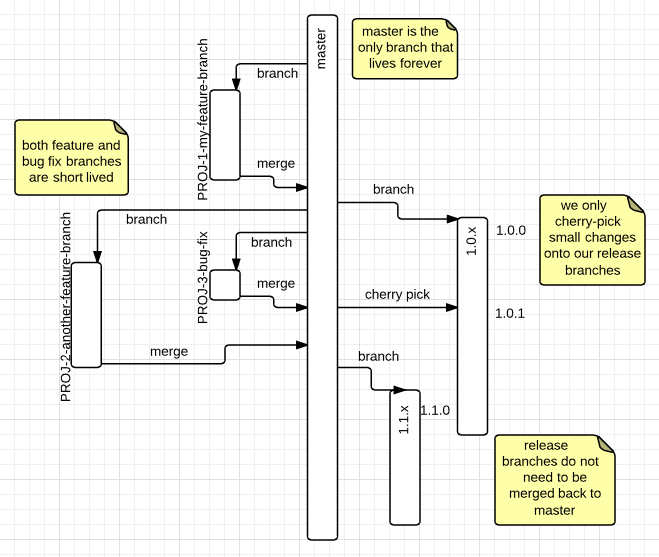
Only Merge Production Ready Code to Master
Do not merge code to master that’s not production ready. This reduces process overhead, and makes it clear when a piece of work is done.
This has some knock on effects, for example, we often deploy branch builds onto test systems for QA. I’ll give you a little tip now, you can get Maven to update your project’s version number to be the branch name so that your artefacts are clearly named for deployment:
BRANCH=$(git branch | grep '^*' | cut -c 3-)
mvn versions:set -DnewVersion=$BRANCH-SNAPSHOT
Change Logs
We need to know what we are releasing, so you need to maintain a change log. There’s many ways to do this, for example:
- You could use your version control’s history. I think this impractical as it requires clear and enforced commit messages.
- You could maintain a file list all your changes, but this is a manual process.
- You could automatically generate the change log. I use a script to merge JIRA information with the version control’s change log or pull requests data from Github. You can find this example Gist.
Worked Example
Lets do an example of this process, we’ll create a project, set-up a commit hook, and then work through a mainline and an interim release. Set-up — Lets create a simple project:
mvn archetype:generate -DarchetypeGroupId=org.apache.maven.archetypes -DarchetypeArtifactId=maven-archetype-quickstart -DarchetypeVersion=1.1 -DgroupId=com.alexecollins.reltut -DartifactId=reltut -Dversion=1.0.0-SNAPSHOT -B
cd reltut/
git init
git add src/ pom.xml
git commit -m 'first version'
We need to work with a remote repository later on, so create one on Github and push, for example:
git remote add origin https://github.com/alexec/reltut.git
git push -u origin master
Commit Message Hook
Let’s set-up our commit hook to enforce message format, we’ll bind it to a Maven lifecycle so all clients get it automatically, add the following lines to your pom.xml:
<plugin>
<artifactId>maven-antrun-plugin</artifactId>
<executions>
<execution>
<id>git-hooks</id>
<phase>initialize</phase>
<goals>
<goal>run</goal>
</goals>
<configuration>
<tasks>
<echo file=".git/hooks/commit-msg">
#! /bin/sh
set -eu
if [ $(cat $1|grep -c '^[A-Z]*-[0-9]* \|Merge\|release') -eq 0 ]; then
echo "non-merge/release commit messages must start with a ticket ID" > /dev/stderr
exit 1
fi
</echo>
<chmod file=".git/hooks/commit-msg" perm="+x"/>
</tasks>
</configuration>
</execution>
</executions>
</plugin>
Now test it:
mvn initialize
> …
git commit -a -m 'updated to enforce commit message'
> non-merge/release commit messages must start with a ticket ID
git commit -a -m 'PROJ-1 updated to enforce commit message'
> [master 7def0dd] PROJ-1 updated to enforce commit message
Note: we allow special cases for releases and merging.
Step-by-step Mainline Release
A mainline release is a big feature release. We can have dozens of dependencies in the final artefact. Updating them all manually is quite time-consuming.
The first thing we need to do is create a release branch. We want to base its name on the current version. We can ask Maven for this:
VERSION=$(mvn help:evaluate -Dexpression=project.version|grep '^[0-9]*\.[0-9]*\.[0-9]*-SNAPSHOT'|sed 's/-SNAPSHOT//')
We can then create a branch based on the major and minor version. Certain versions of the release plugin have issues, so lets lock it to a known good version:
<plugin>
    <artifactId>maven-release-plugin</artifactId>
    <version>2.5.1</version>
    <configuration>
        <autoVersionSubmodules>true</autoVersionSubmodules>
    </configuration>
</plugin>
Note: we also made sure that we correctly version the sub-modules with autoVersionSubmodules.
MAJOR=$(echo $VERSION|tr '.' ' '|awk '{print $1}')
MINOR=$(echo $VERSION|tr '.' ' '|awk '{print $2}')
PATCH=$(echo $VERSION|tr '.' ' '|awk '{print $3}')
BRANCH=$MAJOR.$MINOR.x
mvn release:branch -B -DbranchName=$BRANCH -DreleaseVersion=$MAJOR.$MINOR.0 -DdevelopmentVersion=$MAJOR.$(expr $MINOR + 1).0-SNAPSHOT
Because we’re using Semantic Versioning, we can safely upgrade any minor/patch versions of our dependencies:
git checkout -b $BRANCH
mvn versions:use-latest-releases -DallowMajorUpdates=false
> …
> [INFO] Updated junit:junit:jar:3.8.1 to version 3.8.2
Whoa! I didn’t want to update a third-party dependency! Lets only change the dependencies we control. Revert that change and add this to your pom.xml:
<plugin>
    <groupId>org.codehaus.mojo</groupId>
    <artifactId>versions-maven-plugin</artifactId>
    <configuration>
        <includes>
            <include>com.alexecollins*</include>
        </includes>
    </configuration>
</plugin>
That’ll make sure only our dependencies are updated. We’ll need a dependency to test this, so add this one:
<dependency>
  <groupId>com.alexecollins.docker</groupId>
  <artifactId>docker-java-orchestration</artifactId>
  <version>1.1.0</version>
</dependency>
Run it again, and you can see the changes, we no longer upgrade JUnit, but we do upgrade our own dependency:
[INFO] Updated com.alexecollins.docker:docker-java-orchestration:jar:1.1.0 to version 1.4.0
We need to commit:
git commit -m 'Updated branch dependency minor versions for release' $(find . -name pom.xml)
git push
Note: there might have been no dependency updates. We’ll come back to that later.
To do a release, we need to tell Maven where our code is located in version control:
<scm>
        <connection>scm:git:https://github.com/alexec/reltut.git</connection>
        <developerConnection>scm:git:https://github.com/alexec/reltut.git</developerConnection>
        <tag>master</tag>
</scm>
We also need to tell Maven where to deploy our release to. For testing purposes, we can use /tmp:
<distributionManagement>
    <repository>
        <id>tmp-release</id>
        <url>file:///tmp</url>
    </repository>
</distributionManagement>
Now it is time to release!
mvn release:prepare release:perform -B -DreleaseVersion=$MAJOR.$MINOR.0
Finally, we want to update our dependencies on master to the latest SNAPSHOT versions:
git checkout master
mvn versions:use-latest-versions -DallowMajorUpdates=false
git commit -m 'Updated master dependency minor versions after release' $(find . -name pom.xml)
Step-by-step Interim Release
An interim release is a small release that typically only contains bug fixes. Lets say we know that we need to release our project, but the bug fix is actually in one of its dependencies. We can automatically update the dependencies.
git checkout 1.0.x
Now imagine we had a bug fix in the docker java dependency. To fake this, update and commit the pom.xml to have docker-java-orchestrator version 2.0.0.
mvn versions:use-latest-releases -DallowMajorUpdates=false -DallowMinorUpdates=false
git commit -m 'Updated branch dependency patch versions for release' $(find . -name pom.xml)
You’ll see in the Git log that we automatically updated this dependency’s version, but we only updated the patch version.
mvn release:prepare release:perform -B
If the bug fix is to the project itself, we treat it almost exactly the same as a feature. We branch from master, and merge back to master. We then cherry pick the commits we need from master to the release branch, using Git’s cherry pick command.
Automate it!
We can put this into a simple script. To do a mainline release:
git checkout master
./release.sh
To do a interim release:
git checkout 1.1.x
./release.sh
Conclusion
I hope this post shows you how that, if you are using a sematic versioning system, and haven strong guarantees on quality, then you can reduce the amount of work required to do releases.